Page 1 of 1
New Mac laptop - can’t transfer info
Posted: Mon Mar 10, 2025 6:28 am
by Noggin
I have a very old (10 or 11 years) MacBook Pro.
I want to do a ‘migration’ to a new MacBook Air
BUT - Gmail won’t work on the Pro and the transfer can’t be done if gmail isn’t there - so it seems

Anyone got any ideas of how I can put gmail back on the Pro (I deleted my gmail address from apple mail because it wasn’t working and now can’t put it back
)
OR -
If I just log into the new Air with my apple account, what will be missing if I don’t do a full migration?
I did message my friendly tech on Saturday when I quit trying (one or other machine was about to go out the window and since I can’t throw the old one, I figured I should stop before I killed the new one

). Sadly the tech hasn’t replied yet
Going to sleep for a couple of hours but will have another go this afternoon (hopefully if I get any info here I might succeed!!)
Re: New Mac laptop - can’t transfer info
Posted: Mon Mar 10, 2025 7:29 am
by Mr Moofo
You can just log in with your gmail details
Re: New Mac laptop - can’t transfer info
Posted: Mon Mar 10, 2025 9:40 am
by Ditchfinder
Don't bother using Apple mail for gmail it's rubbish. Much better to use the web interface for gmail.
Re: New Mac laptop - can’t transfer info
Posted: Mon Mar 10, 2025 10:03 am
by Mr Moofo
Ditchfinder wrote: Mon Mar 10, 2025 9:40 am
Don't bother using Apple mail for gmail it's rubbish. Much better to use the web interface for gmail.
What’s rubbish about it?
Re: New Mac laptop - can’t transfer info
Posted: Mon Mar 10, 2025 12:19 pm
by Noggin
Mr Moofo wrote: Mon Mar 10, 2025 7:29 am
You can just log in with your gmail details
To where? In the new one or to Gmail?
I have used the webpage for Gmail, but I did like to have all the mails in one place!
The biggest issue is not being able to do the 'migration' to the new laptop. I've never done anything like this, can't even remember setting up the old one!!
When I try to add the Gmail account to apple mail like this it goes into the death spiral before I even enter any details


When I try to add it using 'other' it doesn't recognise the address or password (even tho I can use both to log in to the web page

).
A friend suggested I may have to change the imap or smtp, but I can't see how to do either


Re: New Mac laptop - can’t transfer info
Posted: Mon Mar 10, 2025 12:23 pm
by KungFooBob
Using the 'other' option, the issue is probably due to 'modern authentication'.
You'll have to login to your Google account and set up an 'app password' to use.
Re: New Mac laptop - can’t transfer info
Posted: Mon Mar 10, 2025 12:45 pm
by Noggin
KungFooBob wrote: Mon Mar 10, 2025 12:23 pm
Using the 'other' option, the issue is probably due to 'modern authentication'.
You'll have to login to your Google account and set up an 'app password' to use.
But it's not asking me for any other authentication - just not accepting what I use??
Not sure I understand "app password" ! Do I go into the google account on the browser? Where do I look for app password?
Re: New Mac laptop - can’t transfer info
Posted: Mon Mar 10, 2025 12:57 pm
by KungFooBob
So the window that pops up when you pick the Google option is for 'Modern Authentication', it's like a web browser window with a Google logo etc... only it's not working for you.
If you want to use IMAP/SMTP they don't support modern authentication, so you need an app password instead.
https://support.google.com/mail/answer/185833?hl=en-GB
However, the best thing would be to get the proper Google option working, I'd make sure that you've got the latest mail app installed and/or try it on a different internet connection if you can.
Re: New Mac laptop - can’t transfer info
Posted: Mon Mar 10, 2025 1:01 pm
by Noggin
Re: New Mac laptop - can’t transfer info
Posted: Mon Mar 10, 2025 1:06 pm
by Noggin
Ok, transfer of info question.
When I follow the process, I get this -
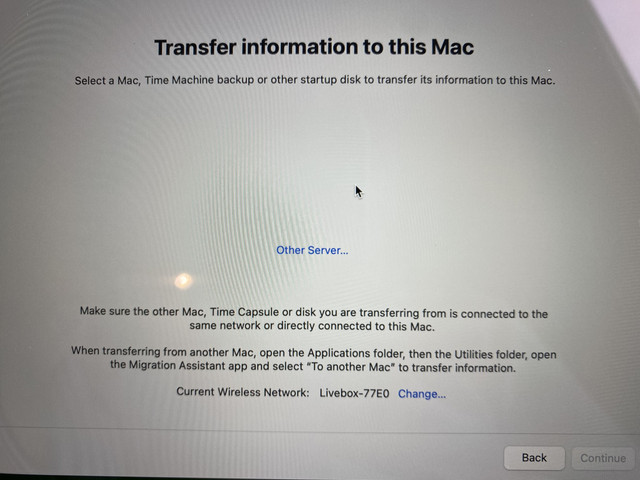
Surely there should be something to select? What am I doing wrong??
Re: New Mac laptop - can’t transfer info
Posted: Mon Mar 10, 2025 1:47 pm
by KungFooBob
I'm not a Mac person, but would suggest that the two can't see each other.
Assuming they're on the same wireless network, do you have to run something on the old Mac?
Do you have any 3rd party firewall software on the old Mac?
There might even be a chance that your wireless network is running in a security mode that doesn't allow clients on the same WLAN to see each other?
Re: New Mac laptop - can’t transfer info
Posted: Mon Mar 10, 2025 2:02 pm
by Noggin
Some of that makes sense!! But I cheated - I gave up trying to get them to talk to each other and have just set up the new one on it's own!!
I moved all the desktop stuff to icloud so it's all visible - just needs sorting.
The tech got back to me after I'd started, so I'm hoping to take the old one down for TLC at some point so can ask him if I find any issues in the meantime!!
The bestest thing was sorting out the gmail account, so huge thank yous


